Contents
- Index

Converting Numbers to Words
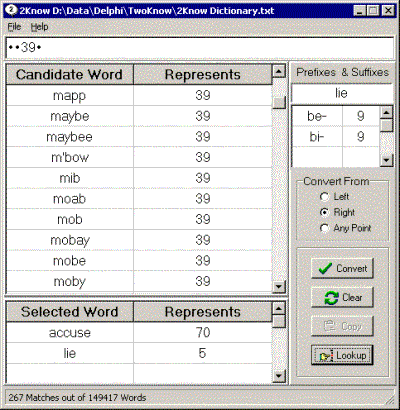
Fig. 1: Converting 70395 to 'accuse maybe lie'.
It also converts to 'example'.
Here is the short version on how to convert numbers to words:
Select conversion order, Left, Right, or Any Point.
Enter the number in the edit box at the top of the form and hit the enter key.
Scroll through the "Candidate Words' and select one by clicking on it.
Select a suffix or prefix by clicking on it and optionally confirm its spelling.
Continue until the number is fully converted.
Words can be deselected by clicking on them.
Click "Copy" to copy the finished phrase the clipboard for subsequent pasting.
That's all there is to it. Now for the long version.
Enter the number to convert in the edit box at the top of the form. Special characters (e.g. commas, spaces, dashes, decimal points) can be used but will limit the number of candidate words.
Hit  on the keyboard or click
  to display 'Candidate' words.
Select a 'Candidate' word by clicking on it. The original number is then redisplayed with converted letters replaced by a bullet.
Select a suffix or prefix by clicking on it and optionally confirm its spelling. No grammar or spelling rules are applied to winnow the available affixes so many of them will make no sense.
Continue selecting words and affixes until the entire number is converted.
Click  to copy the number and selected word(s) to the clipboard. The copied information can be pasted to other applications.
At any time you can remove a 'Selected' word by clicking on it.
The order of conversion is controlled as follows
 Conversion begins with the leftmost digit and proceeds to the right. Consequently only suffixes may be appended.
 Conversion begins with the rightmost digit and proceeds to the left. Consequently prefixes and suffixes may be appended.
 Allows conversion to begin at any point in the numeric string. Selecting potentially translates the numeric string into the fewest number of words because places fewer restricitons on the candidate words and both prefixes and suffixes may be appended.
Prof. Krill suggests picking noun on the right, a verb on the left, and adjectives in the middle.
At any time click  to clear the form.
Resizable portions of the main form include width, height, the number of rows for the Candidate/Selected words (click-hold-drag the border between the Candidate and Selected frames), and the column widths of the words and numbers (click-hold-drag the column divider in the title row. The size and and column widths of the Lookup form are also resizable.
NB: There may be multiple ways to pronounce a word. The program may select a pronunciation that is inconsistent with the way you say the word. So, always check and make sure the pronunciation is consistent with your own. Words that have ambiguous pronunciations appear in italics.